
Product research · A practical OSINT lesson
Product recall check: does the warning cover this exact model?
A recall photo looks like the lamp on a seller’s page. The colour matches. So does the shape. Before calling it a match, turn the lamp over: the small label may answer a question the large photograph cannot.
A useful recall check connects a particular item to the scope of an official notice. Start with the model and any batch, serial or date limits stated in that notice. Then compare those limits with evidence from the item being offered. A missing identifier leaves the match unresolved; it does not clear the product.
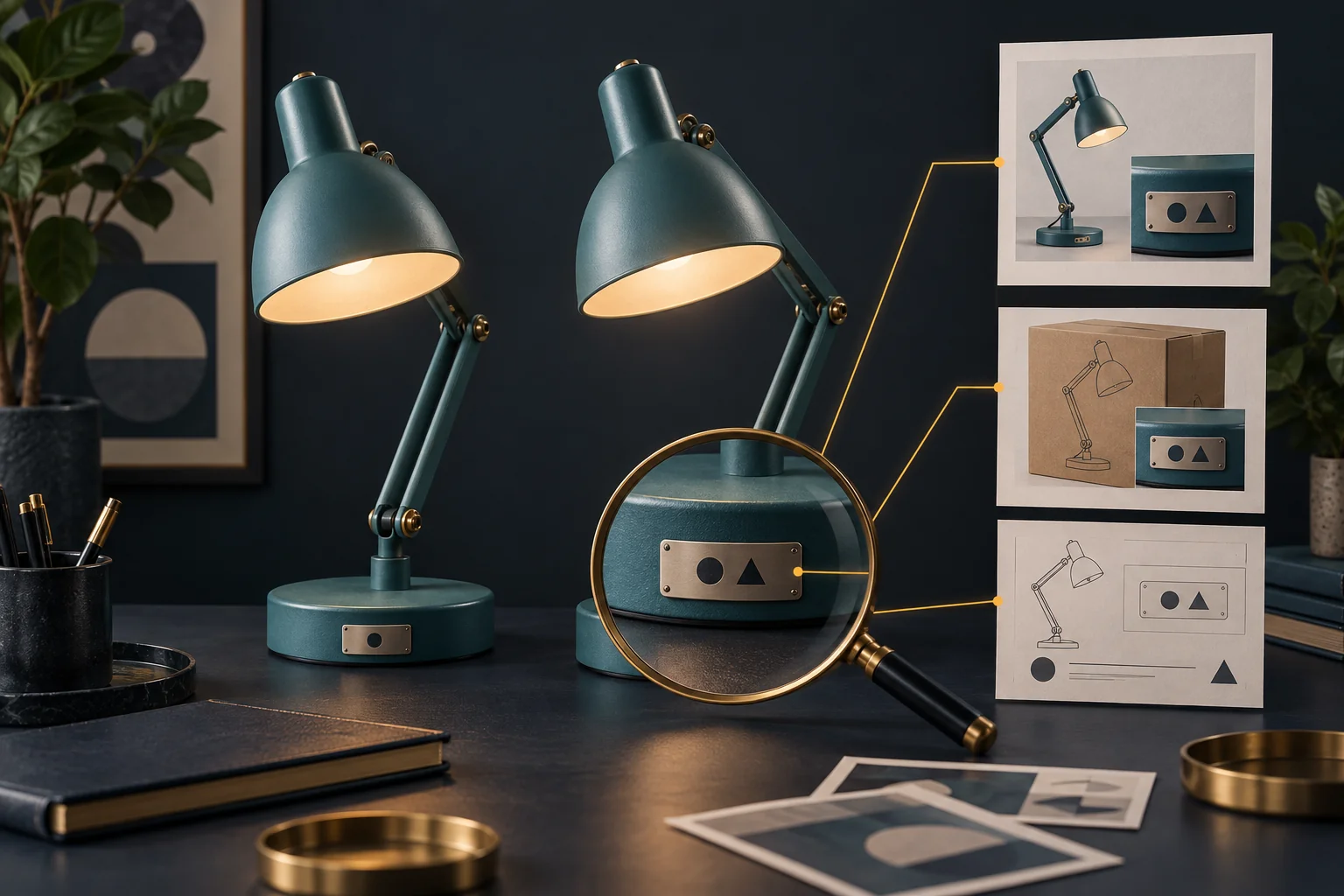
Find the identifier that belongs to the item
Keep the listing URL, the seller’s exact model wording and the date you checked it. A product-family name such as “Studio Light” may cover several versions. A retailer’s stock code may identify its own catalogue entry, while the manufacturer uses another code on the product.
When available, compare the label on the item with the packaging and the listing. Record which source supplied each value. Do not silently replace an unclear character with your best guess: O and 0 can lead to different searches. Ask for a clear label photo through the normal seller channel when needed, excluding personal information.
This is a different task from checking whether the seller is a real business. Use the company verification guide for that relationship; a genuine company can still offer an item whose recall status needs checking.
Read the notice as a set of conditions
Search the appropriate official source for the market and product category. The US CPSC recall directory supports product searches. The European Commission’s Safety Gate covers alerts about dangerous non-food products. Neither is a worldwide safety certificate. Open the full notice rather than relying on a search snippet or a reposted warning.
Make two passes. First, establish the product identity: brand, model, distinguishing parts and the label location. Next, read the boundaries: listed batches, serial ranges, manufacturing dates, markets or other restrictions. Use the conditions actually present; not every notice includes every field.
A real example shows why photographs and words belong together. CPSC notice 27-004, dated 1 October 2026, names Urban Arrow bicycle models and describes recalled seat posts with two silver bolts. The product family alone is less specific than that description. Consult the current notice for its full scope and remedy; this example is about reading an identifier, not inspecting or repairing a bicycle.
Try three labels against one fictional notice
Training example, not a real recall: a fictional notice covers model DL-40, batches B21 and B22. A marketplace photo shows a teal desk lamp. Here are three possible label readings.
| Item label | What the comparison establishes | Useful next step |
|---|---|---|
| DL-40 / B22 | Both identifiers match this notice’s stated scope. | Follow the official notice and its verified contact route. |
| DL-40 / batch unreadable | The model matches, but the batch condition cannot be tested. | Obtain the missing identifier or ask the official recall contact. |
| DL-41 / B22 | The model differs from the one in this notice. | Search DL-41 separately; this notice does not establish its safety. |
The middle row is where a weak check often fails. “I cannot read the batch” quietly becomes “I found no problem.” Keep it as an open question. Likewise, the third row rules out only this exact match. It does not rule out another notice, an incorrect label or a different problem.
Try changing the fictional notice so it covers all batches of DL-40. The second row now changes: the missing batch no longer prevents a model-level match. This is why the notice must supply the test, rather than a universal checklist making up requirements.
Handle an empty search honestly
Check whether you searched the manufacturer, the retail brand or only the seller. Try the exact model and a spaced or hyphenated version without discarding the original. If the notice identifies a particular component, search that component’s maker too. Record the source and filters so another reader can repeat the search.
Write: “No matching notice was found in the CPSC directory for DL-41 under the searches recorded on 8 October 2026.” Do not shorten that to “DL-41 is safe.” The first statement describes work you can show. The second makes a much larger claim.
If a notice matches, use its current instructions. Do not improvise a repair or assume another market’s refund process applies. If the item’s identity remains uncertain, resolve that uncertainty with the official contact before treating the search as complete.
Save a result that someone can use
Your research note needs only six things: the item’s listing, the identifier evidence, the notice number and URL, its scope, the comparison result and the remaining question. Add the access date. Keep “model matches” separate from “this individual unit matches” when batch or serial conditions remain.
A free official lookup may finish the job. If the seller, importer and manufacturer tell conflicting stories, the task becomes a wider public-source investigation. An OSINT Jet specialist review request can start with that exact conflict and your saved records. Ask for the relationships and claims to be checked; do not ask an OSINT report to certify physical safety. The review request leads to scope and pricing before paid work begins.
Published 8 October 2026 · OSINT Jet