
OSINT Training: Learn how to turn a single clue into a real investigation.
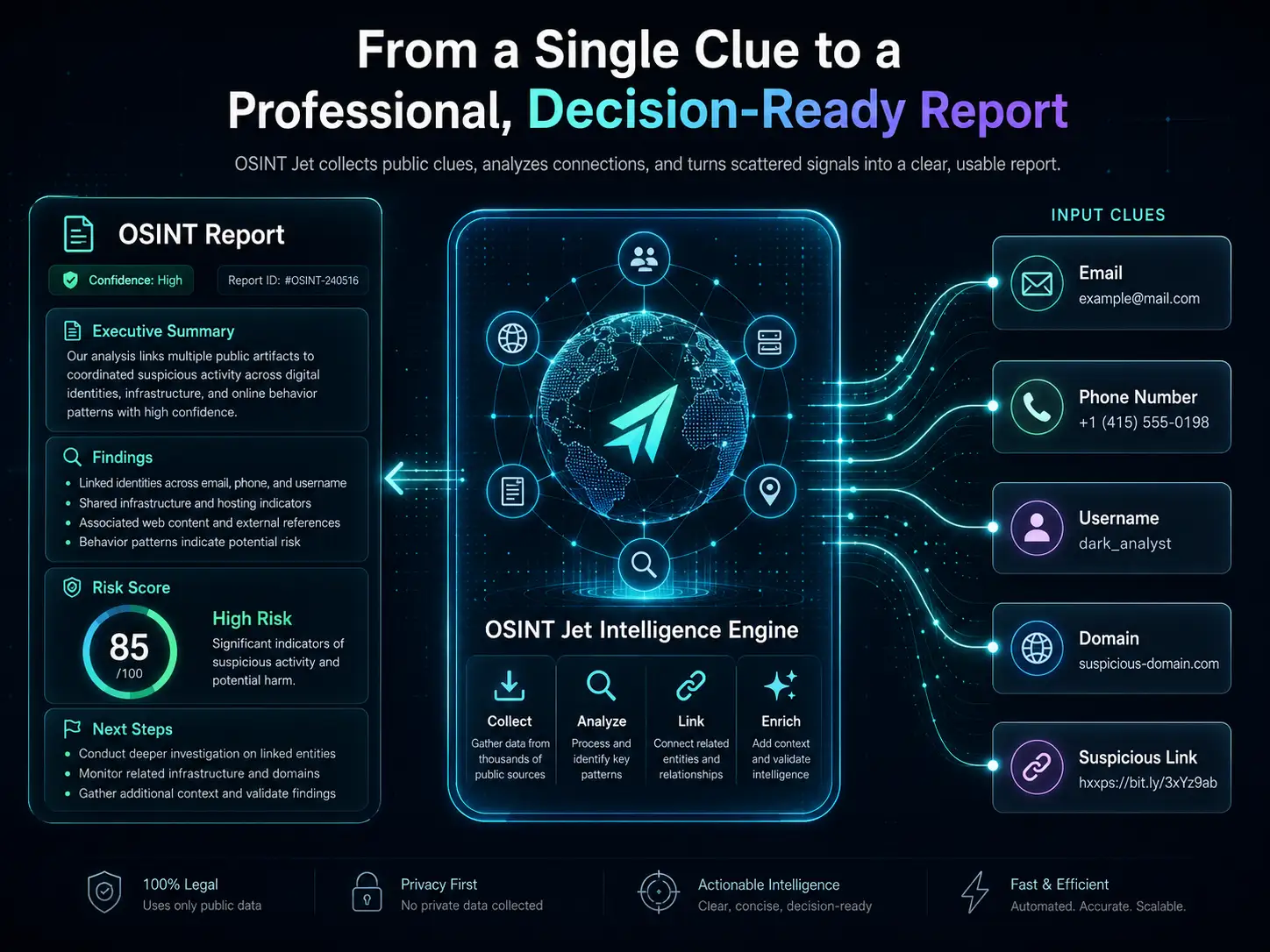
If you are new to OSINT, keep it simple: start with one clue, understand what it is, look for traces in public sources, connect what makes sense, check what is weak or uncertain, and turn the result into something clear and useful. That is what this page is about. And when you want to move faster, go deeper, and get a structured report instead of a pile of tabs, OSINT Jet’s Intelligence Engine helps you take public clues and turn them into a clean, decision-ready OSINT report. It is fast, practical, beginner-friendly, and built for real investigations.
Learn the logic first. Then use OSINT Jet to search deeper, analyze signals, connect clues, validate findings, and generate a professional report you can actually use.
If you are just getting started with OSINT, start here.
This page explains the practical learning path. For the basic definition, types of clues, and the bigger picture, start with What Is OSINT?. Then come back here and learn how to actually use OSINT in a simple, structured way.
Real OSINT training is not just a list of tools. It teaches you how to think.
Tools matter, but tools alone do not make a good investigation. Good OSINT training teaches you how to define the problem, understand the clue, search the right places, avoid false matches, validate what you find, and explain the result clearly.
Think in clues and entities
Email, username, phone number, domain, company name, image, message, or suspicious link — each clue leads to a different investigation path.
Know the clueSearch with a purpose
Every search should answer a question. You are not just browsing. You are testing signals, checking context, and looking for evidence.
Smarter searchingValidate before you trust
Not every match is the right match. Good OSINT means spotting weak signals, reused usernames, old data, copied content, and misleading results.
Confidence mattersHow does OSINT Jet work? Learn the same logic in 7 simple steps.
This is the part most beginners need. Do not overcomplicate it. Start with the clue, clean it up, search public sources, use new clues to go deeper, connect the signals, validate what looks real, and build a final report.
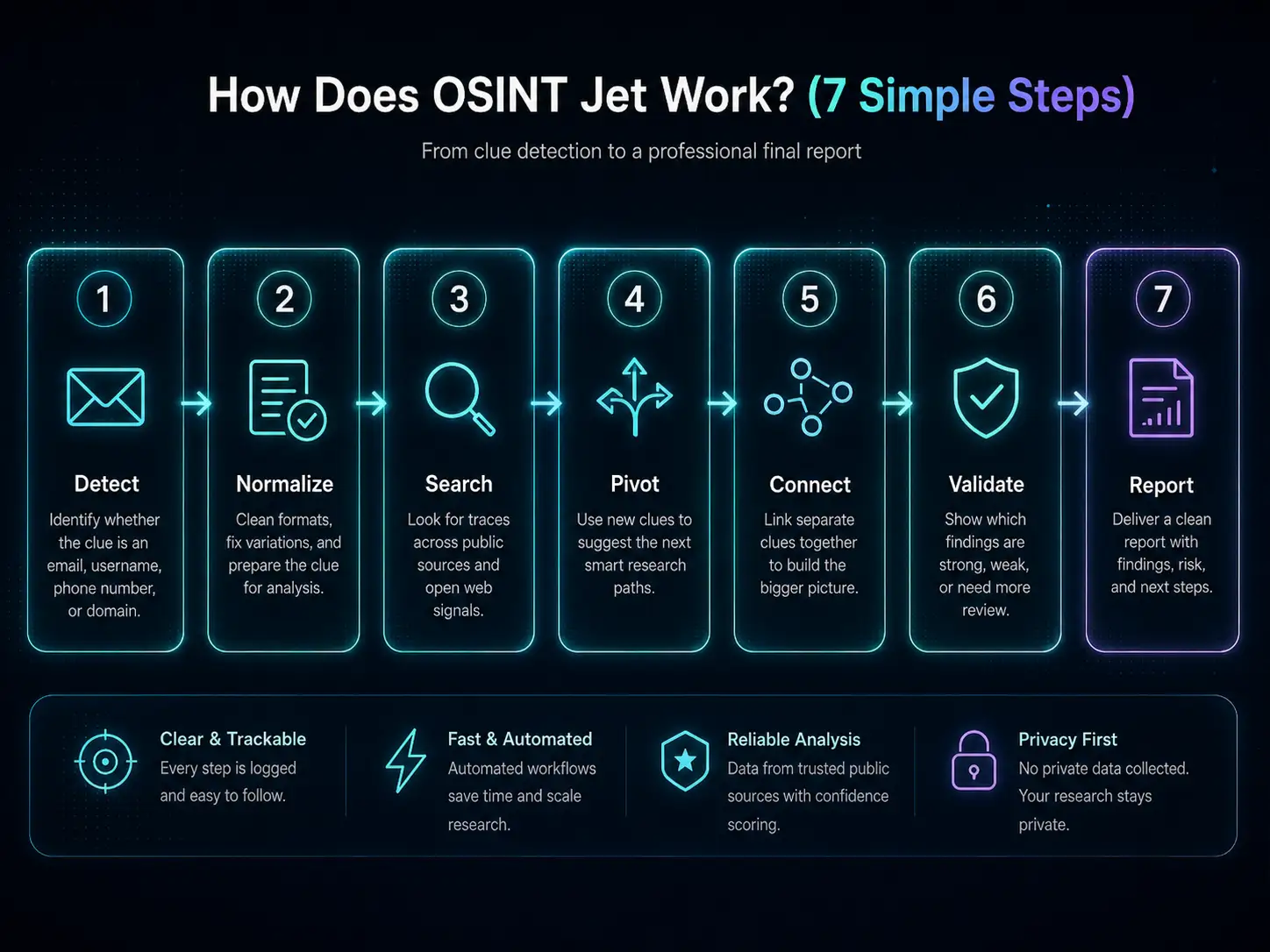
7 simple steps
Figure out what you have: an email, username, phone number, domain, company, image, or suspicious link.
Clean up spelling, formats, country codes, handles, and small variations before you investigate.
Look for traces across websites, public profiles, domain data, archives, search results, and open web signals.
Use new findings to suggest the next smart move: another profile, another domain, a related email, or a broader pattern.
Bring separate signals together so you can see the bigger picture instead of a random set of links.
Show which findings are strong, weak, unclear, contradictory, or need another round of checking.
Turn everything into a clean report with findings, confidence, risks, and next steps you can actually use.
What this process helps you avoid
- Opening dozens of tabs without knowing what question you are trying to answer.
- Assuming a similar username or profile automatically belongs to the same person.
- Mixing strong evidence with weak guesses and not telling them apart.
- Losing the source context of what you found and where you found it.
- Missing connections between emails, domains, usernames, links, and public identities.
- Ending with a messy note dump instead of a usable OSINT report.
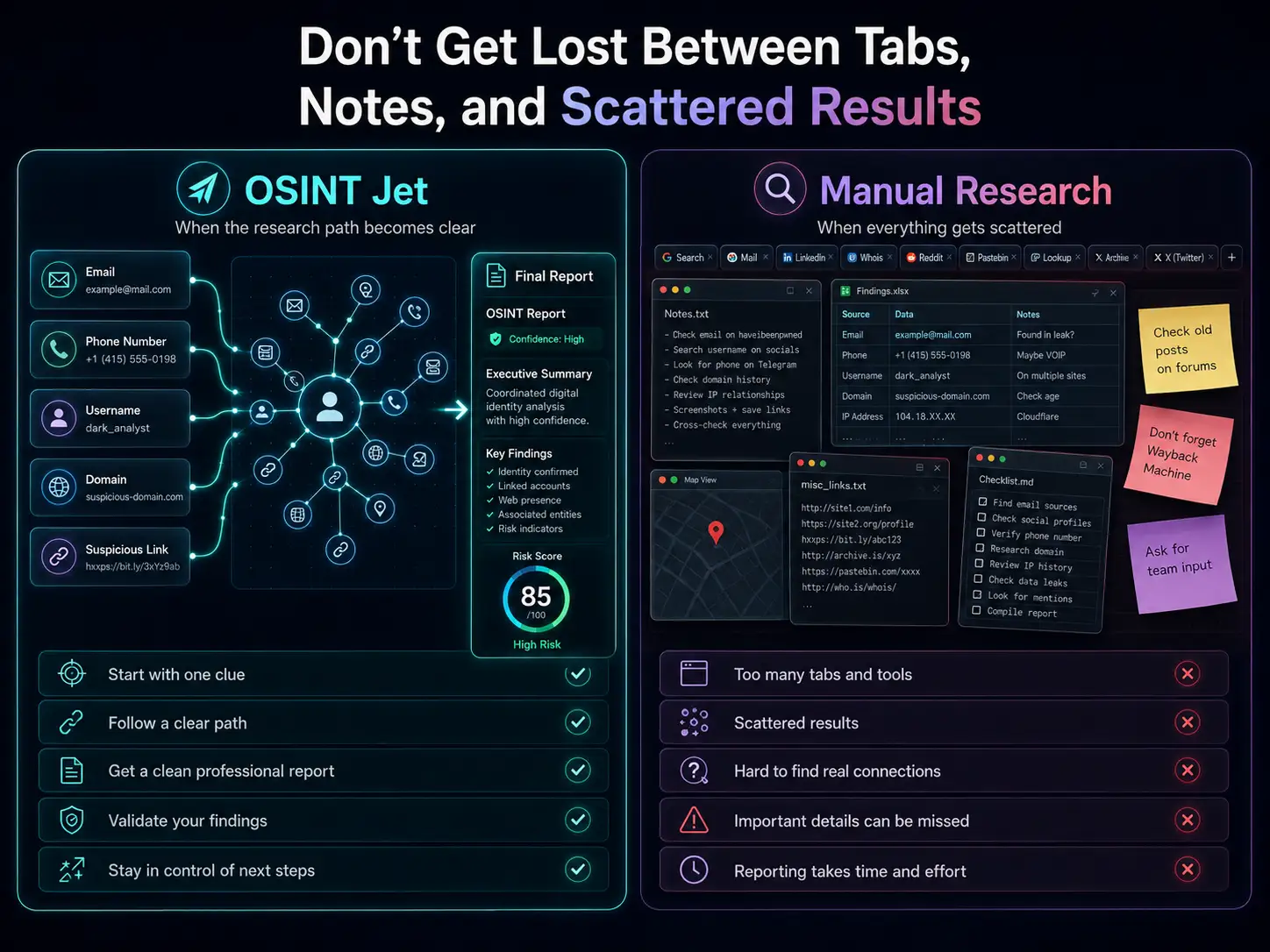
Do not get lost between tabs, notes, and scattered results.
Manual research still has value. It teaches you how the web works and how clues behave. But when a case grows, the problem is not just finding data — it is organizing it, validating it, and turning it into a report. That is exactly where OSINT Jet shines.
With OSINT Jet
- You can start with one clue and get a clear investigation path.
- You get a structured report instead of scattered notes and raw links.
- You can see which findings look stronger and which need more review.
- The engine searches deeply across public web signals, analyzes patterns, and helps connect related clues fast.
- You stay in control of next steps — deeper continuation only happens with your approval.
- It is built for beginners who need clarity and for professionals who need speed.
With manual research
- You usually jump between many tools, tabs, screenshots, and scattered notes.
- Important connections between clues can be easy to miss.
- False matches and weak signals can waste a lot of time.
- Turning everything into a clean report takes effort, patience, and experience.
- Deeper research across many sources can become slow and hard to manage.
- Beginners often do not know what to search next or how to judge what they found.
Choose the right path for the clue you have.
After you understand the basic workflow, the next step is choosing the right OSINT path. OSINT Jet covers the most important investigation types and helps you move from simple searching to real intelligence work.
Email OSINT
Check where an email appears, what other clues it leads to, and whether it connects to a broader digital footprint.
Investigate email cluesUsername OSINT
Track a username across public platforms, compare identities, and look for consistent or suspicious patterns.
Map usernamesDomain OSINT
Investigate websites, domains, public infrastructure signals, and trust indicators before you believe a claim or click a link.
Investigate domainsPhone Number OSINT
Look at the public traces around a phone number carefully and responsibly, especially when the clue is ambiguous.
Investigate phone cluesImage OSINT
Work with visible clues in an image, compare context, and connect image-based leads to the bigger investigation.
Visual cluesCompany OSINT
Check business claims, websites, public contact details, digital trust signals, and possible fraud indicators.
Investigate companiesThe fastest way to understand OSINT is to learn the logic, then see it in action.
Start by practicing with simple public clues. Then, when you want a much faster and more powerful result, OSINT Jet can search deeply across public sources, analyze the relationships, and return a professional report in minutes instead of leaving you stuck in manual research for hours or days.
Learn the method first. Then let OSINT Jet do the heavy lifting.
OSINT Jet is designed to help you move from manual searching to real intelligence work. It can collect public clues, analyze them at speed, find patterns, connect related signals, and give you a clean report with findings, risks, and next steps. That is why it is one of the fastest and most practical ways to do modern AI-powered OSINT.
Use safe, public examples before you work on real cases.
This is a self-study learning path, not an instructor-led course or professional certification. You need a browser and a notebook. Finish each exercise with a reviewable output before moving on; none requires researching another person’s private information.
Exercise 1: Build a clue sheet
Question: what are example domains used for? Write the question, a proposed source and the evidence you need. Search site:iana.org "Example Domains" and read the source page. Record its URL, retrieval time and a one-sentence answer in your own words.
Pass check: your note distinguishes the source’s statement from your interpretation. A search-result snippet alone is not your evidence.
Output: one scoped question and one documented sourceExercise 2: Search layer by layer
Compare site:iana.org "Example Domains" with site:iana.org example domains. Then try site:un.org filetype:pdf "annual report" to find public reports.
site: limits the domain; quotes target a phrase; filetype: limits the file type. Keep the operator attached to its value. Record what changes, without treating result counts as complete coverage.
Exercise 3: Score your findings
Read the three fictional records in our worked evidence example. Separate observation, inference and missing evidence for each record.
Pass check: a copied directory entry is not independent confirmation, and a similar company name is not a verified identity link. Your conclusion should remain “unverified,” rather than “definitely legitimate” or “fraudulent.”
Output: three findings with evidence and explicit uncertaintyFinish with a one-page OSINT report
Use five headings: research question; sourced findings; unresolved issues; confidence and its reasons; next step. Example: “A publishes the claim; B copies A; C is not yet linked to the website. To resolve this, verify the registration identifier and domain connection.” Another reader should be able to retrace your reasoning.
Operator reference: Google’s official search guidance. Continue with the search tools guide and free clue-preparation exercises.
When should you stop searching manually and switch to OSINT Jet?
Manual searching is great for learning and for small checks. But once the case becomes bigger, more valuable, or more confusing, speed and structure start to matter a lot. That is where OSINT Jet becomes the smarter move.
- You have multiple clues like an email, username, phone number, domain, company, screenshot, or suspicious link that may connect.
- You want faster, deeper public-source research without getting lost in dozens of tabs.
- You need something clearer than raw search results — a report with findings, confidence, risks, and next steps.
- You want to investigate deeply across the web, connect patterns, and keep the case organized from start to finish.
- You need a higher-value or more sensitive case handled through Manual OSINT Investigation.
A practical OSINT learning path for real people and real cases.
Beginners
Learn where to start, what to search, how to avoid false matches, and when it is time to move from manual searching to a structured AI-assisted report.
Start hereResearchers and journalists
Keep your public-source research cleaner, more organized, and easier to validate when the case starts expanding.
Research-focusedBusinesses and security teams
Check suspicious domains, online identities, digital risk signals, public business claims, and connected clues much faster.
Operational valueGood OSINT respects the law, privacy, and uncertainty.
OSINT Jet is built for legal, ethical, public-source investigation. This training is not for unauthorized access, harassment, doxxing, privacy abuse, or harmful misuse. Good OSINT means using public information responsibly, understanding context, and staying honest about what your evidence can and cannot prove.
Common questions about OSINT training
What is OSINT training?
OSINT training teaches you how to investigate public information in a structured way. It includes understanding clues, searching smartly, validating findings, linking entities, mapping signals, and turning the result into a clear report.
Should I read “What Is OSINT?” before this page?
Yes. Start with What Is OSINT? for the basics, then come back to this page for the practical workflow.
Can beginners really learn OSINT?
Absolutely. The key is not trying to do everything at once. Start with one clue, follow a simple process, and learn how to separate strong findings from weak ones.
Is OSINT the same as hacking?
No. OSINT works with public information and legal research methods. It is not about unauthorized access or harmful activity.
Why use OSINT Jet after learning the basics?
Because it helps you move much faster, search deeper across public sources, connect related clues, analyze patterns, and get a professional report instead of a messy manual workflow.
What is a good first OSINT exercise?
Start with a safe, public clue you already understand, like your own digital footprint, a public brand page, a test domain, or a public username you control. The goal is to practice the process, not to chase random data.
Ready to move from manual searching to fast, professional OSINT?
Learn the basics, practice the workflow, explore the right OSINT path for your clue, and when you are ready, let OSINT Jet search deeply across public sources, analyze the signals, and turn the result into a professional report in minutes.
Build six practical OSINT skills
After the beginner exercises above, use these lessons to practise one skill at a time. Keep a single notebook with your question, source links, observations and unresolved points. You can read the guides freely; this is a self-study route, not a professional qualification.
Find a source you can actually read
Start with the Google dorks walkthrough. Compare the purpose of the three example searches, open the underlying public source and record what answered your question. Your output is a source note, not a screenshot of a result count.
Ready to move on: another reader can open your source and distinguish its statement from your interpretation.
Choose a resource for a specific job
Follow the OSINT Framework directory exercise. Write down the category you used, the resource it led to and the question that resource can answer. Finding a link is the beginning of source assessment.
Keep: one useful route and one limitation. A longer tool list is not the goal.
Separate a domain record from an ownership story
Read the example.org RDAP and DNS case. Identify what each record describes and retain the observation date. If you repeat a lookup, record the new result separately instead of silently replacing the historical example.
Keep: the record, its date and the narrow conclusion it supports.
Explain why a username result can be wrong
The Sherlock local lab uses fictional pages to demonstrate a detection problem. First explain the recorded result in your own words. Running the optional lab requires the local setup described in the guide.
Check yourself: why can a page returning HTTP 200 still be a missing profile?
Keep the two dates in a service record apart
Use the synthetic example in the Shodan result interpretation guide. Write one sentence about the source’s observation and a separate note about when the researcher retrieved it. The exercise does not require a live Shodan search or a paid account.
Keep: one supported statement and one claim the record cannot settle.
Hand the reasoning to someone else
Fill in the OSINT report template and evidence ledger. Give each significant finding a source reference, explain the inference and leave unresolved questions visible. Use the template’s fictional case for a self-contained exercise.
Finish when: a reader can trace the conclusion to the evidence without guessing what happened between them.
The lessons use separate teaching examples. Do not connect example.org, a fictional username and the sample company into a supposed real identity. The transferable skill is the method of recording and reviewing evidence.
A short review before your next investigation
- Does each observation have a source and an appropriate date?
- Have you explained at least one plausible alternative to your interpretation?
- Could the next researcher tell which question remains open?
Once you can produce that handoff, compare it with the AI-assisted investigation workflow. The useful decision is whether organizing several connected clues into a report would help your case. Check the report credits and pricing before starting a paid investigation.
Explore this topic
Practice interpretation as well as searching
Read a service record carefully, then turn it into a finding another researcher can check. These two lessons develop the judgment and reporting habits that a list of tools cannot teach on its own.